Saturday, August 20, 2022

Java Pass By Reference And Pass By Value

Reference

Java Pass By Value Example

In this example, we will showcase how to pass a parameter by using pass-by-value which is also known as call-by-value.

Here we have initialized a variable ‘a’ with some value and used the pass-by-value technique to show how the value of the variable remains unchanged. In the next segment, we will try to show a similar example, but we will use non-primitives.

public class Example {
     
    /*
     *  The original value of a will remain unchanged in
     *  case of call-by-value
     */
     
    int a = 10;
    void call(int a) {
         
        // this local variable a is subject to change in its value
        a = a+10;
    }
     
    public static void main(String[] args) {
 
        Example eg = new Example();
        System.out.println("Before call-by-value: " + eg.a);
         
        /*
         * Passing an integer 50510 to the call() method. The value of
         * 'a' will still be unchanged since the passing parameter is a
         * primitive type.
         */
        eg.call(50510);
        System.out.println("After call-by-value: " + eg.a);
         
         
    }
}

Output:

Java pass by value

Java Passing Object: Pass by Reference Example

In this example, we will see how to pass any object of a class using pass-by-reference.

As you can see, when we have passed the object reference as a value instead of a value, the original value of the variable ‘a’ is changed to 20. This is because of the changes in the called method.

public class Example {
     
    /*
     *  The original value of 'a' will be changed as we are trying
     *  to pass the objects. Objects are passed by reference.
     */
     
    int a = 10;
    void call(Example eg) {
        eg.a = eg.a+10;
    }
     
    public static void main(String[] args) {
 
        Example eg = new Example();
        System.out.println("Before call-by-reference: " + eg.a);
         
        // passing the object as a value using pass-by-reference
        eg.call(eg);
        System.out.println("After call-by-reference: " + eg.a);
         
         
    }
}

Output:

Java passing Object - pass by Reference

Ways To Create A Pass-by-Reference

Java supports pass-by-value,0 but there are three different ways to create a pass-by-reference in Java.

  • Make the member variable public inside a class.
  • Return a value from a method and update the same inside the class.
  • Create a single element array and pass it as a parameter to the method.

Making The Member Variable Public

In this technique, the object of a class is passed to the add() method and it updates the public member variable ‘a’. You can see that the original memory address where the value is stored has been changed.

public class Example {
     
    // making a public member variable
    public int a;
     
    public Example() {
        a = 10;
    }
     
    public static void main(String[] args) {
 
        Example eg = new Example();
         
        // Before calling the add() method
        System.out.println("Before calling method: " +eg.a);
         
        // calling method
        add(eg);
         
        // After calling the add() method
        System.out.println("after calling method: " +eg.a);
         
    }
     
    // add() method starts here that increments 'a' by 1
    public static void add(Example obj) {
        obj.a++;
    }
     
}

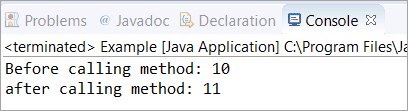
Output:

Making the member variable Public

Returning A Value From A Method

In this technique, we are trying to return a value from add() method as we have changed the type from “void” to “int”. The changes or addition in the value is returned by the add() method and the original memory address has been updated.

public class Example {
     
    public static void main(String[] args) {
         
        int a = 10;
         
        // Before calling the add() method
        System.out.println("Before calling method: " +a);
         
        // calling method
        a = add(a);
         
        // After calling the add() method
        System.out.println("after calling method: " +a);
         
    }
     
    // add() method starts here that increments 'a' by 1
    public static int add(int a) {
        a++;
        return a;
    }
     
}

Output:

Returning a value from a method

Creating A Single Element Array & Passing As A Parameter

In this technique, we have created a single element array and passed it as a parameter to the method add(int a[]). You can see that the original memory address is changed in this case as well.

public class Example {
     
    public static void main(String[] args) {
         
        // single element array
        int a[] = {10};
         
        // Before calling the add() method
        System.out.println("Before calling method: " +a[0]);
         
        // calling method
        add(a);
         
        // After calling the add() method
        System.out.println("after calling method: " +a[0]);
         
    }
     
    // add() method starts here that increments 'a' by 1
    public static void add(int a[]) {
        a[0]++;
    }
     
}

Output:

Creating a single element array

Frequently Asked Questions

Q #1) Can you pass by reference in Java?

Answer: Java supports pass by value and we can not pass primitive types to a method directly by using pass by reference. However, there are different ways to create a pass by reference as discussed above.

Q #2) Does Java pass arrays by reference?

Answer: Java supports pass by value but when we are dealing with objects such as Java array objects, then the object reference is passed to the method.

Q #3) Does Java pass objects by reference or value?

Answer: This won’t be wrong to say that the “Objects in Java are passed by reference”. But if you want a technically correct statement then the above statement can also be put as “Object references in Java are passed by value”.

Q #4) Explain why there is no call by reference in Java.

Answer: Call by reference needs the memory location to be passed and these memory locations further require pointers which Java does not have. Hence, there is no call by reference in Java.

Q #5) Why pointers are not used in Java?

Answer: Unlike the C language, Java does not have pointers. The prime reason for not using pointers in Java can be security as pointers may compromise the security that comes along with Java. The use of Pointers might have made Java more complex.

Java Constructors


In this tutorial, we will learn about Java constructors, their types, and how to use them with the help of examples.

What is a Constructor?

A constructor in Java is similar to a method that is invoked when an object of the class is created.

Unlike Java methods, a constructor has the same name as that of the class and does not have any return type. For example,

class Test {
  Test() {
    // constructor body
  }
}

Here, Test() is a constructor. It has the same name as that of the class and doesn't have a return type.

Recommended Reading: Why do constructors not return values


Example 1: Java Constructor

class Main {
  private String name;

  // constructor
  Main() {
    System.out.println("Constructor Called:");
    name = "Programiz";
  }

  public static void main(String[] args) {

    // constructor is invoked while
    // creating an object of the Main class
    Main obj = new Main();
    System.out.println("The name is " + obj.name);
  }
}

Output:

Constructor Called:
The name is Programiz

In the above example, we have created a constructor named Main(). Inside the constructor, we are initializing the value of the name variable.

Notice the statement of creating an object of the Main class.

Main obj = new Main();

Here, when the object is created, the Main() constructor is called. And, the value of the name variable is initialized.

Hence, the program prints the value of the name variables as Programiz.


Types of Constructor

In Java, constructors can be divided into 3 types:

  1. No-Arg Constructor
  2. Parameterized Constructor
  3. Default Constructor

1. Java No-Arg Constructors

Similar to methods, a Java constructor may or may not have any parameters (arguments).

If a constructor does not accept any parameters, it is known as a no-argument constructor. For example,

private Constructor() {
   // body of the constructor
}

Example 2: Java private no-arg constructor

class Main {

  int i;

  // constructor with no parameter
  private Main() {
    i = 5;
    System.out.println("Constructor is called");
  }

  public static void main(String[] args) {

    // calling the constructor without any parameter
    Main obj = new Main();
    System.out.println("Value of i: " + obj.i);
  }
}

Output:

Constructor is called
Value of i: 5

In the above example, we have created a constructor Main(). Here, the constructor does not accept any parameters. Hence, it is known as a no-arg constructor.

Notice that we have declared the constructor as private.

Once a constructor is declared private, it cannot be accessed from outside the class. So, creating objects from outside the class is prohibited using the private constructor.

Here, we are creating the object inside the same class. Hence, the program is able to access the constructor. To learn more, visit Java Implement Private Constructor.

However, if we want to create objects outside the class, then we need to declare the constructor as public.

Example 3: Java public no-arg constructors

class Company {
  String name;

  // public constructor
  public Company() {
    name = "Programiz";
  }
}

class Main {
  public static void main(String[] args) {

    // object is created in another class
    Company obj = new Company();
    System.out.println("Company name = " + obj.name);
  }
}

Output:

Company name = Programiz

2. Java Parameterized Constructor

A Java constructor can also accept one or more parameters. Such constructors are known as parameterized constructors (constructor with parameters).

Example 4: Parameterized constructor

class Main {

  String languages;

  // constructor accepting single value
  Main(String lang) {
    languages = lang;
    System.out.println(languages + " Programming Language");
  }

  public static void main(String[] args) {

    // call constructor by passing a single value
    Main obj1 = new Main("Java");
    Main obj2 = new Main("Python");
    Main obj3 = new Main("C");
  }
}

Output:

Java Programming Language
Python Programming Language
C Programming Language

In the above example, we have created a constructor named Main(). Here, the constructor takes a single parameter. Notice the expression,

Main obj1 = new Main("Java");

Here, we are passing the single value to the constructor. Based on the argument passed, the language variable is initialized inside the constructor.


3. Java Default Constructor

If we do not create any constructor, the Java compiler automatically create a no-arg constructor during the execution of the program. This constructor is called default constructor.

Example 5: Default Constructor

class Main {

  int a;
  boolean b;

  public static void main(String[] args) {

    // A default constructor is called
    Main obj = new Main();

    System.out.println("Default Value:");
    System.out.println("a = " + obj.a);
    System.out.println("b = " + obj.b);
  }
}

Output:

Default Value:
a = 0
b = false

Here, we haven't created any constructors. Hence, the Java compiler automatically creates the default constructor.

The default constructor initializes any uninitialized instance variables with default values.

TypeDefault Value
booleanfalse
byte0
short0
int0
long0L
char\u0000
float0.0f
double0.0d
objectReference null

.. 


Difference between abstract class and interface

 Abstract class and interface both are used to achieve abstraction where we can declare the abstract methods. Abstract class and interface both can't be instantiated.

But there are many differences between abstract class and interface that are given below.

Abstract classInterface
1) Abstract class can have abstract and non-abstract methods.Interface can have only abstract methods. Since Java 8, it can have default and static methods also.
2) Abstract class doesn't support multiple inheritance.Interface supports multiple inheritance.
3) Abstract class can have final, non-final, static and non-static variables.Interface has only static and final variables.
4) Abstract class can provide the implementation of interface.Interface can't provide the implementation of abstract class.
5) The abstract keyword is used to declare abstract class.The interface keyword is used to declare interface.
6) An abstract class can extend another Java class and implement multiple Java interfaces.An interface can extend another Java interface only.
7) An abstract class can be extended using keyword "extends".An interface can be implemented using keyword "implements".
8) A Java abstract class can have class members like private, protected, etc.Members of a Java interface are public by default.
9)Example:
public abstract class Shape{
public abstract void draw();
}
Example:
public interface Drawable{
void draw();
}

Simply, abstract class achieves partial abstraction (0 to 100%) whereas interface achieves fully abstraction (100%).

techguruspeaks

  Core Java programming Introduction to Java Java Features Writing a Simple Java Program Java Keywords and Comments Variables, Identifiers ...