Tuesday, August 13, 2019

Java Tools


jGRASP Plugin for IntelliJ

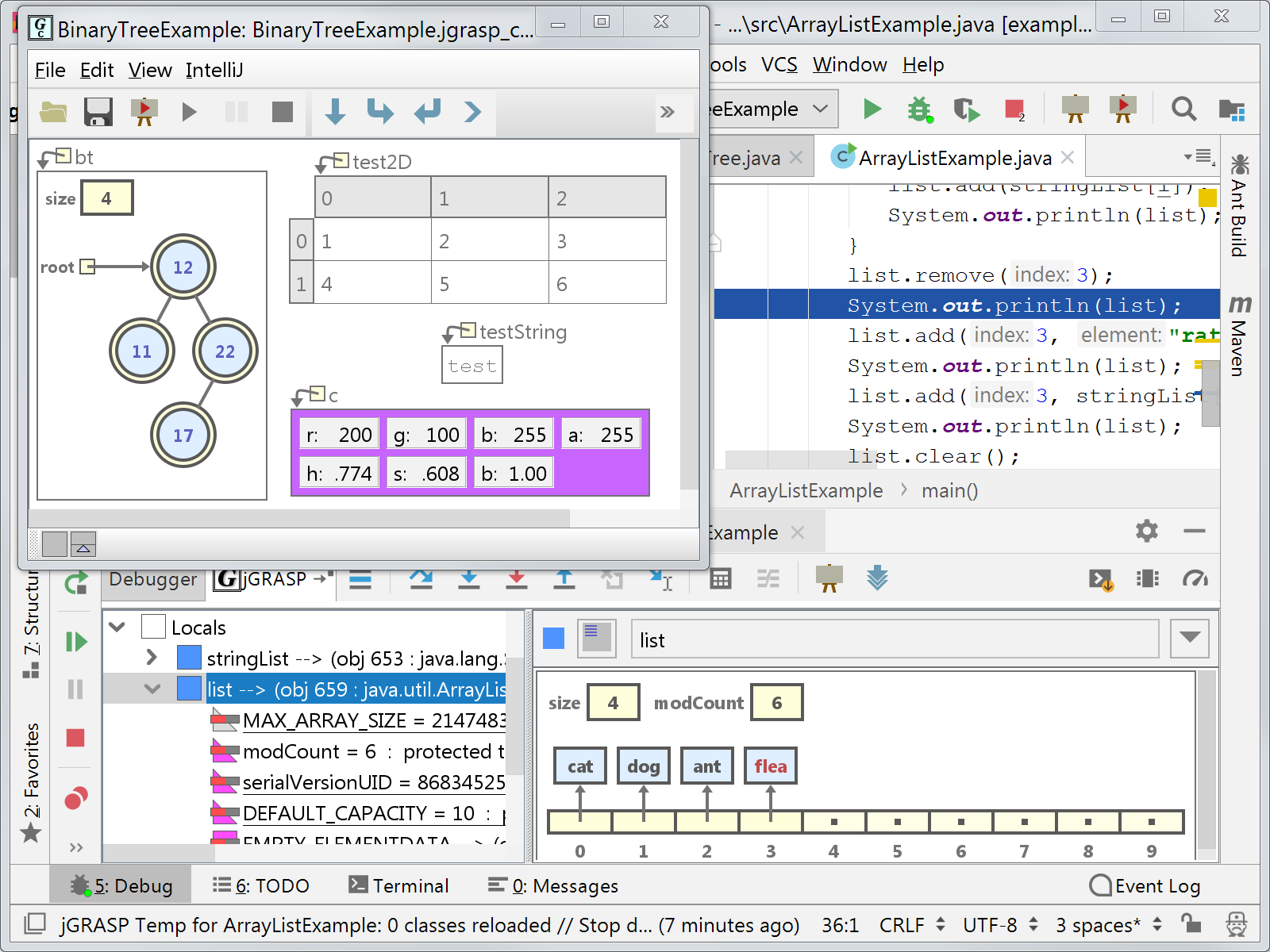
The jGRASP Plugin for IntelliJ brings the jGRASP viewers and viewer canvas to the IntelliJ Java and Kotlin debugger in IDEA, Android Studio, and other IntelliJ-derived Java and/or Kotlin IDEs.


import java.util.ArrayList;

public class ArrayListDemo {
public static void main(String[] args) {
ArrayList<String> cars = new ArrayList<String>();
cars.add("Volvo");
cars.add("BMW");
cars.add("Ford");
cars.add("Mazda");
System.out.println(cars);
}
}


// class to create nodes
class Node {
int key;
Node left, right;

public Node(int item) {
key = item;
left = right = null;
}
}

class BinaryTreeDemo {
Node root;

// Traverse tree
public void traverseTree(Node node) {
if (node != null) {
traverseTree(node.left);
System.out.print(" " + node.key);
traverseTree(node.right);
}
}

public static void main(String[] args) {

// create an object of BinaryTree
BinaryTreeDemo tree = new BinaryTreeDemo();

// create nodes of the tree
tree.root = new Node(1);
tree.root.left = new Node(2);
tree.root.right = new Node(3);
tree.root.left.left = new Node(4);

System.out.print("\nBinary Tree: ");
tree.traverseTree(tree.root);
}
}


VisualVM IDE Integrations

Use the VisualVM features from within your favorite Java IDE!

Open sources from VisualVM results in your favorite Java IDE! Learn how.

NetBeans

Use the profiler in Apache NetBeans (3rd party) to analyze code within the NetBeans IDE. It utilizes a profiling engine similar to VisualVM and is tightly integrated into the IDE. Home »


Eclipse

Use the Eclipse Launcher to integrate VisualVM with the Eclipse IDE. The plugin enables starting VisualVM along with the executed application and automatically opens the application tab.

Installation: download the plugin (.zip, 68.1KB), unzip it and add as a local update site, then install the VisualVM Launcher Feature.

Configuration: setup the plugin by configuring path to JDK (not JRE) and VisualVM installation using Run/Debug-Launching-VisualVM Configuration.

Usage: create a custom application configuration and choose the VisualVM Launcher as application launcher for the Run/Debug actions.


IntelliJ IDEA

Use the VisualVM Launcher (3rd party) to integrate VisualVM with IntelliJ IDEA. The plugin enables starting VisualVM along with the executed application. Home »


VS Code

Install the GraalVM Tools for Java extension and start VisualVM along with the project and/or control the VisualVM session from within the VS Code. Supports opening sources from VisualVM results back in the VS Code editor. Home »


IBM Pattern Modeling and Analysis Tool for Java Garbage Collector (PMAT)

How To


Summary

IBM Pattern Modeling and Analysis Tool for Java Garbage Collector is a tool that parses verbose GC trace, analyzes Java heap usage, and recommends key configurations based on pattern modeling of Java heap usage.

Objective

  1. Download: https://www14.software.ibm.com/cgi-bin/weblap/lap.pl?popup=Y&la_formnum=&li_formnum=L-JHWG-85RFJN&accepted_url=https://public.dhe.ibm.com/software/websphere/appserv/support/tools/pmat/ga458.jar
  2. Open a terminal or command prompt and change directory to where you downloaded the JAR file.
  3. Ensure that Java is on your PATH to run the tool.
  4. Launch the tool:
    java -Xmx1g -jar ga*.jar
Note: PMAT has no new development and therefore, in general, we recommend using the IBM Monitoring and Diagnostic Tools - Garbage Collection and Memory Visualizer (GCMV) tool which has more recent development and a similar feature set (recommendation engine, etc.).

Environment

Pattern Modeling and Analysis Tool for IBM® Java™ Garbage Collector (PMAT) parses verbose GC trace, analyzes Java heap usage, and recommends key configurations based on pattern modeling of Java heap usage.

Main screen

When the JVM (Java virtual machine) cannot allocate an object from the current heap because of lack of space, a memory allocation fault occurs, and the Garbage Collector is invoked. The first task of the Garbage Collector is to collect all the garbage that is in the heap. This process starts when any thread calls the Garbage Collector either indirectly as a result of allocation failure or directly by a specific call to System.gc(). The first step is to get all the locks needed by the garbage collection process. This step ensures that other threads are not suspended while they are holding critical locks. All other threads are then suspended. Garbage collection can then begin. It occurs in three phases: Mark, Sweep, and Compaction (optional).

Verbose GC is a command-line option that one can supply to the JVM at start-up time. The format is: -verbose:gc or -verbosegc. This option switches on a substantial trace of every garbage collection cycle. The format for the generated information is not designed and therefore varies among various platforms and releases.

This trace should allow one to see the gross heap usage in every garbage collection cycle. For example, one could monitor the output to see the changes in the free heap space and the total heap space. This information can be used to determine whether garbage collections are taking too long to run; whether too many garbage collections are occurring; and whether the JVM crashed during garbage collection.

How does it work?
PMAT analyzes verbose GC traces by parsing the traces and building pattern models. PMAT recommends key configurations by executing a diagnosis engine and pattern modeling algorithm. If there are any errors related with Java heap exhaustion or fragmentation in the verbose GC trace, PMAT can diagnose the root cause of failures. PMAT provides rich chart features that graphically display Java heap usage.

The following features are included:
  • GC analysis
  • GC table view
  • Allocation failure summary
  • GC usage summary
  • GC duration summary
  • GC graph view
  • GC pattern analysis
  • Zoom in/out/selection/center of chart view
  • Option of changing chart color.

The tool can also parse Java HotSpot garbage collector traces, including the following:
  • Serial collector
  • Throughput/parallel collector
  • Concurrent collector
  • Incremental/train collector

jhat - Java Heap Analysis Tool

SYNOPSIS

jhat [ options ] <heap-dump-file>

PARAMETERS

options
Options, if used, should follow immediately after the command name.
heap-dump-file
Java binary heap dump file to be browsed. For a dump file that contains multiple heap dumps, you may specify which dump in the file by appending "#<number> to the file name, i.e. "foo.hprof#3".

DESCRIPTION

The jhat command parses a java heap dump file and launches a webserver. jhat enables you to browse heap dumps using your favorite webbrowser. jhat supports pre-designed queries (such as 'show all instances of a known class "Foo"') as well as OQL (Object Query Language) - a SQL-like query language to query heap dumps. Help on OQL is available from the OQL help page shown by jhat. With the default port, OQL help is available at http://localhost:7000/oqlhelp/

There are several ways to generate a java heap dump:

  • Use jmap -dump option to obtain a heap dump at runtime;
  • Use jconsole option to obtain a heap dump via HotSpotDiagnosticMXBean at runtime;
  • Heap dump will be generated when OutOfMemoryError is thrown by specifying -XX:+HeapDumpOnOutOfMemoryError VM option;
  • Use hprof.

NOTE: This tool is experimental and may not be available in future versions of the JDK.

OPTIONS

-stack false/true
Turn off tracking object allocation call stack. Note that if allocation site information is not available in the heap dump, you have to set this flag to false. Default is true.
-refs false/true
Turn off tracking of references to objects. Default is true. By default, back pointers (objects pointing to a given object a.k.a referrers or in-coming references) are calculated for all objects in the heap.
-port port-number
Set the port for the jhat's HTTP server. Default is 7000.
-exclude exclude-file
Specify a file that lists data members that should be excluded from the "reachable objects" query. For example, if the file lists java.lang.String.value, then, whenever list of objects reachable from a specific object "o" are calculated, reference paths involving java.lang.String.value field will not considered.
-baseline baseline-dump-file
Specify a baseline heap dump. Objects in both heap dumps with the same object ID will be marked as not being "new". Other objects will be marked as "new". This is useful while comparing two different heap dumps.
-debug int
Set debug level for this tool. 0 means no debug output. Set higher values for more verbose modes.
-version
Report version number and exit.
-h
Output help message and exit.
-help
Output help message and exit.
-J<flag>
Pass <flag> to the Java virtual machine on which jhat is run. For example, -J-Xmx512m to use a maximum heap size of 512MB.


VisualGC

Some features of the plugin require a paid subscription. Learn more
Compatible with all IntelliJ-based IDEs
Screenshot 1
Screenshot 2

A realtime Visual Garbage Collection Monitoring Tool for Hotspot JVM, supports G1 and ZGC


Tuesday, May 14, 2019

How to get java.sql.TimeStamp in Java?

There are multiple way to get an instance of Timestamp.


Approach 1: Using Timestamp constructor.
Timestamp timeStamp1 = new Timestamp(System.currentTimeMillis());
Timestamp timeStamp2 = new Timestamp(2020, 1, 9, 14, 49, 11, 627);

Approach 2: Using java.util.Date.
Date date = new Date();
Timestamp timeStamp3 = new Timestamp(date.getTime());

Approach 3: Using Instant.
Instant instant = date.toInstant();
Timestamp timeStamp4 = Timestamp.from(instant);

Approach 4: Using LocalDateTime.
LocalDateTime localDateTime = LocalDateTime.now();
Timestamp timeStamp5 = Timestamp.valueOf(localDateTime);

App.java
package com.sample.app;

import java.util.Date;
import java.sql.Timestamp;
import java.time.Instant;
import java.time.LocalDateTime;

public class App {

  public static void main(String args[]) {
    Timestamp timeStamp1 = new Timestamp(System.currentTimeMillis());
    
    Timestamp timeStamp2 = new Timestamp(2020, 1, 9, 14, 49, 11, 627);
    
    Date date = new Date();
    Timestamp timeStamp3 = new Timestamp(date.getTime());
    
    Instant instant = date.toInstant();
    Timestamp timeStamp4 = Timestamp.from(instant);
    
    LocalDateTime localDateTime = LocalDateTime.now();
    Timestamp timeStamp5 = Timestamp.valueOf(localDateTime);
    
    System.out.println(timeStamp1);
    System.out.println(timeStamp2);
    System.out.println(timeStamp3);
    System.out.println(timeStamp4);
    System.out.println(timeStamp5);

  }

}

Output
2020-01-09 14:56:09.344
3920-02-09 14:49:11.000000627
2020-01-09 14:56:09.349
2020-01-09 14:56:09.349
2020-01-09 14:56:09.415

Sunday, September 11, 2016

Access Modifiers in Java | Example Program


What is Modifier in Java?


modifier in java is a keyword that we add to those definitions that we need to change their meaning.

In other words, a modifier limits the visibility of classes, fieldsconstructors, or methods in the Java program.

The functionality of members of a class or a class itself can be protected from other parts of the program by the presence or absence of modifiers.

Java language provides a total of 12 modifiers. They are public, private, protected, default, final, synchronized, abstract, native, strictfp, transient, and volatile.

Twelve modifiers in java can be divided into two categories:

  • Access modifiers
  • Non-access modifiers

In this tutorial, we will focus only on access modifiers and in the next tutorial, we will cover non-access modifiers.

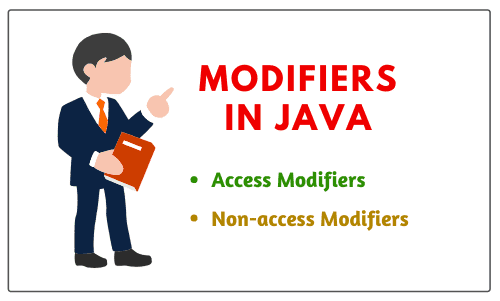
Modifiers in Java

Access Modifiers in Java


Access modifiers/specifiers in java define the boundary for accessing members of a class and a class itself.

In other words, access modifiers are those modifiers that are used to restrict the visibility (accessibility) of classes, fields, methods, or constructors.

In short, the accessibility/visibility of data depends on the access modifiers. The access modifiers are also known as visibility modifiers.

Java provides four explicit access modifiers in object-oriented programming languages. They are private, default, protected, and public as shown in the below figure.Access specifiers in java

Private Access Modifier in Java


There are the following points about private access modifiers that need to keep in mind.

1. Private access modifier in java can apply to a variable, method, constructor, inner class but not the outer class that is class itself.

2. The instance variable can be private but a local variable cannot be private.

3. Private members (field, method, or constructor) of a class cannot be accessed from outside the class. They are accessible only within the class.

4. Private members of a superclass cannot be inherited to the subclass. Therefore, they are not accessible in subclasses.

5. If we make any constructor as private, we cannot create an object of that class from another class and also cannot create the subclass of that class.

6. A class cannot be private except for inner classes. Inner classes are members of the outer class. So, members of the class can be private.

7. If we declare a method as private, it behaves as a method declared as final. We cannot call the private method from outside the class.

Let us create a program where we will create two classes Class A and Class B. In class A, we will declare field and method as private. When we will access this private field and private method from outside the class B, then they will give a compile-time error. Look at the source code to understand better.

Program source code 1:

package modifiersProgram; 
class A // Here, Class is default. 
{ 
// Declaration of Instance Variable. 
  private int data = 30; // Here, instance variable is private. 

// Declaration of instance method. 
  private void msg() // Here, method is also private. 
  { 
    System.out.println("Hello Java, this is my first java program"); 
  } 
}

Now, create another class B and call private field and method of class A.

class B 
{ 
// Main method.
   public static void main(String[] args) 
   { 
// Create an object of class A and call members of class A using reference variable 'a'. 
  A a = new A(); // a is a reference variable of class A and pointing to the objects of class A. 
  System.out.println(a.data): // Compile time error will occur because we cannot call private members of any class from outside the class. 
  a.msg(); // Compile time error. So we cannot call the private method of any class because this is accessible within the class only. 
    } 
}

Role of Private Constructor


If we declare any constructor of a class as private then we cannot create an object of that class from outside the class. In other words, we cannot create the subclass of that class.

Let’s take an example program where we will declare a constructor of class as private and try to create an object of that class. But, we will get a compile-time error.Program source code 2:

package modifiersProgram; 
 class A 
{ 
// Declaration of Constructor. 
    private A() // Here, Constructor is declared as private. 
    { 
       System.out.println("Constructor is private"); 
    } 
// Declaration of instance method. 
    private void msg() // Method is private. 
    { 
       System.out.println("Method is private"); 
    } 
}

Now, create another class B and call class A from class B. As you will call class A, it will give compile-time error.

class B 
{ 
// Main method. 
   public static void main(String args[]) 
   { 
// Create the object of class A. 
     A a = new A(); // Compile time error because the constructor is private and we cannot create the object of class A from outside the class. 
   } 
}

Q. Can you find the error in the code?

private class Student
{
 private int roll = 4;
 private class Name
 {
   // Inner class 
 }
}

Ans: Outer class cannot be private but inner class can be private. Instance variable can be private. The outer class is also known as top-level class.

The only five modifiers are applicable to a top-level class. They are public, default, final, abstract, and strictfp.

By mistake, if you will try to use any other modifiers with top-level class, you will get a compile-time error: “Modifier private not allowed here”.

For more detail, go to this tutorial: Private Constructor in Java

Default Access Modifier in Java


1. When access modifier is not specified to members of a class or a class itself, it is called default access modifier.

2. The default can apply to the instance variable, local variable, constructor, methods, inner class, or outer class.

3. Default members of a class are visible inside of the class and everywhere within classes in the same package or folder only. Therefore, they can be accessed from outside the classes in the same package but can not be accessed outside the package.

4. Default members can be inherited to the subclass within the same package only. It cannot be inherited from outside the package.

Let’s understand the default access modifier or specifier better with the help of an example program.

In this example program, we have created two packages pack1 and  pack2. We are accessing class A from outside its package since class A is a default, not public. Therefore, it cannot be accessed from outside the package.

Program source code 3:

package pack1; 
class Student 
{ 
// Declaration of Instance variable. 
   int roll = 12; // Here, instance variable is default. 
 
// Declare the method. 
  void name() // Here, method has been defined with default access modifier. 
  { 
    System.out.println(" Hello Java"); 
  } 
}
package pack2; 
import pack1.*; 
class College 
{ 
// Main method. 
   public static void main(String[] args) 
   { 
// Creating an object of class Student from package pack2. 
   Student obj = new Student(); // Compile time error because class Student has been defined with default access modifier and cannot be instantiated from outside the package. But, if it is declared as public then we can instantiate from outside the package. 
     obj.name(); // Compile time error because of the default access modifier.
    }
 }

Protected Access Modifier in Java


1. Protected access modifier can be applied to instance variables, local variables, constructors, methods, inner classes but not the outer class.

2. Protected members are accessible inside the class and everywhere within classes in the same package and outside the package but through inheritance only.

3. Protected members can be inherited to the subclass.

4. If we make constructor as protected then we can create the subclass of that class within the same package but not outside the package

Let’s take an example program to understand the concept of default access modifier.

In this example, we have created two packages pack1 and pack2. The Student class of pack1 package is public. So, it can be accessed from outside the package.

But the name() method of this package is declared as protected. So, it can be accessed from outside the class only through inheritance.

Program source code 4:

package pack1; 
public class Student 
{ 
// Declaration of Instance variable. 
    int roll = 12; // here instance variable is default. 
   protected void name() // Here method has been defined with protected access modifer. 
   { 
     System.out.println("My roll no. is 12"); 
   } 
}
package pack2; 
import pack1.*; 
class College extends Student 
{ 
 public static void main(String args[]) 
 { 
// Creating the object of class Student from pack2. 
    Student obj = new Student(); // Calling the method using reference variable obj. 
     obj.name(); 
  } 
 }
Output: 
       My roll no. is 12.

Public Access Modifier in Java


1. Public access modifier can apply to instance variables, constructors, inner classes, outer class, methods but not with local variables.

2. Public members of a class can be used anywhere.

3. Public members of a class can be inherited to any subclass.

Let’s understand public access modifier with the help of an example program to understand better.

Program source code 4:

package pack1; 
public class Student 
{ 
  int roll = 12; // Here, instance variable is default. 
  public void name() // Here, method has been defined with protected access modifier. 
  { 
    System.out.println(" My roll no. is 12"); 
  } 
}
package pack2; 
import pack1.*; 
class College extends Student 
{ 
  public static void main(String args[]) 
  { 
// Creating the object of class Student from pack2. 
     Student obj = new Student(); 
      obj.name(); 
   } 
 }
Output: 
       My roll no. is 12

Private Protected Access in Java


A variable or field can be declared with two keywords as private and protected together like this:

private protected int age;

It provides the visibility level in between the “protected access” and “private access”. This modifier makes the variable visible in all the subclasses regardless of what package they are in but the field cannot be accessed by other classes in the same package.

Visibility of Access Modifier in Java


The below table summarizes the visibility of various access modifiers in java.

Access locationPublicProtectedDefaultPrivate protectedPrivate
Same classYesYesYesYesYes
Subclass in same packageYesYesYesYesNo
Other classes in same packageYesYesYesNoNo
Subclasses in other packageYesYesNoYesNo
Non-subclasses in other packagesYesNoNoNoNo

Key of Access modifiers:

Private  >  Default  >  Protected  >  Public
More restrictive ----------------> Less restrictive.                                        
                                 Decreasing

Applicable Modifiers with Classes, Methods, Variables, Interfaces


Outer Class (Top-level Class):

1. The only five modifiers are applicable to the outer class. They are public, default, final, abstract, and strictfp.

2. Final and abstract both cannot be applied simultaneously with a class. It is an illegal combination.

3. If a class is declared as public, private, or protected cannot be applied simultaneously with public class. It is also an illegal combination.

Inner Class:

1. The applicable modifiers for the inner class are public, private, protected, default, final, abstract, static, and strictfp.

2. The non-applicable modifiers for inner class are synchronized, native, transient, and volatile.

3. The modifiers which are not applicable for inner classes but not applicable for outer classes are private, protected, and static.

Methods:

1. The only two modifiers out of 12 that are not applicable for methods are transient and volatile.

2. If a method is declared as public, we cannot declare simultaneously private or protected with a public method.

3. If a method is defined as abstract, we cannot apply final, static, synchronized, native, private, or strictfp.

Variables:

1. The modifiers applicable for variables are public, protected, private, default, final, static, transient, and volatile.

2. The non-access modifiers such as abstract, synchronized, native, and strictfp are not applicable for variables.

3. The only applicable modifier with local variable is final. If a variable is declared as final, we cannot declare as volatile.

Constructors:

1. For a constructor, only access modifiers are applicable. The access modifiers like public, protected, default, and private can be applied with constructors.

2. Non-access modifiers cannot be applied with constructors. By mistake, if you apply any other modifiers with constructor except these four access modifiers, you will get a compile-time error.

Blocks:

1. Static and synchronized modifiers are only applicable for blocks.

Outer Interface:

1. Public, default, abstract, and strictfp are modifiers that are applicable for outer interface. Except for these modifiers, we cannot apply other modifiers with outer or top-level interface.

2. The non-access modifier that is applicable for classes but not applicable for an interface, is final.

Inner Interface:

1. For inner interface, we can apply modifiers like private, default, protected, public, abstract, static, and strictfp.

2. The non-access modifiers such as final, synchronized, native, transient, and volatile are not applicable for inner interface.

Outer Enum:

1. The only three modifiers like public, default, and strictfp are applicable for outer enum.

2. The modifiers which are applicable for classes but not applicable for enum are final and abstract.

Inner Enum:

1. For enum, we can apply all four access modifiers and two non-access modifiers like static, and strictfp.


Hope that this tutorial has covered all important points related to access modifiers/specifiers in java with example programs. I hope that you will have understood access modifiers and their applications.
Thanks for reading!!!

Next ⇒ Non-access modifiers in Java

⇐ PrevNext ⇒

techguruspeaks

  Core Java programming Introduction to Java Java Features Writing a Simple Java Program Java Keywords and Comments Variables, Identifiers ...